Selfia: A Script Font for Crafters and Product Creators
The Beauty of Handwritten Typography in Modern Crafting
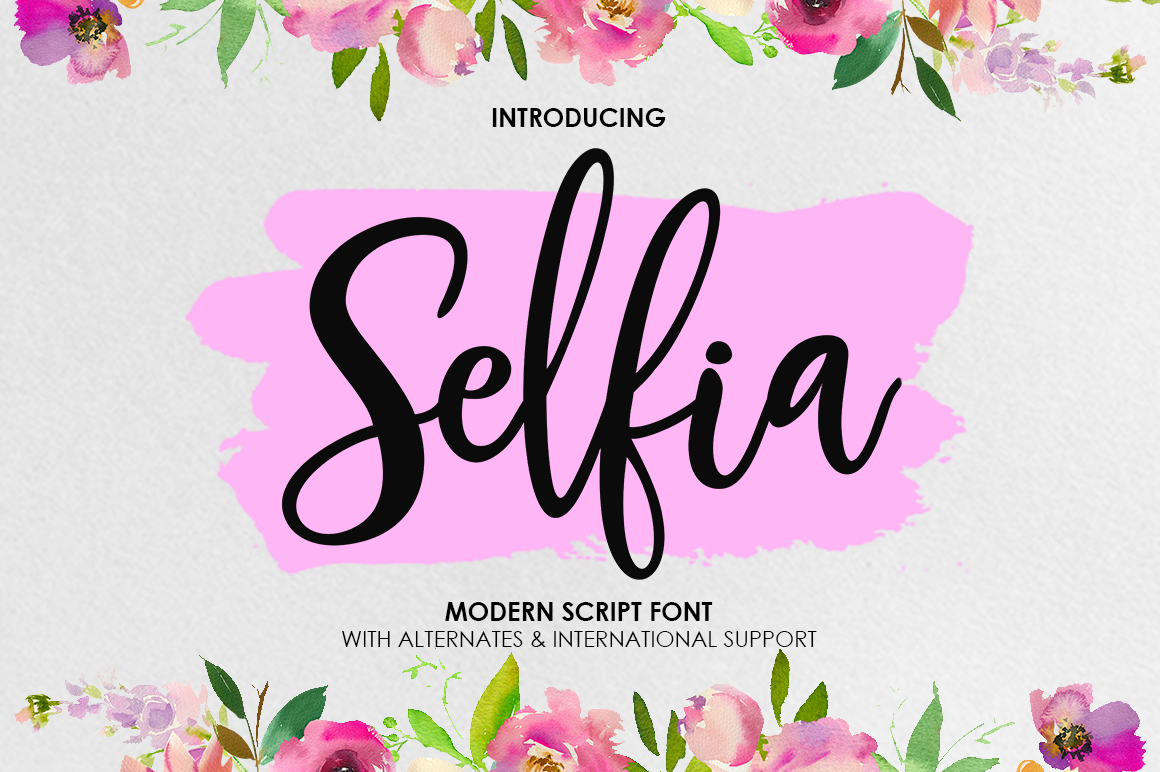
As a handmade seller and printable product creator, I know how crucial the right font can be to the success of your craft. It's not just about aesthetics—it's about clarity, appeal, and consistency. That's where Selfia comes in. This modern calligraphy script offers a fresh, handwritten style that feels both elegant and approachable. Whether you're designing wedding invitations or creating digital printables, Selfia brings a unique charm that elevates your work without overwhelming it.
What Makes Selfia Stand Out?
Selfia is more than just a script font—it's a versatile typeface designed with practicality in mind. Its modern take on traditional calligraphy gives it a clean, contemporary feel while still retaining the warmth of a handwritten style. The font features many stunning alternates, allowing you to create variety and personality in your designs. These alternates are perfect for adding flair to titles, names, and decorative elements without sacrificing readability.
One of the standout qualities of Selfia is its flow. The letters move smoothly from one to the next, giving your text a natural rhythm that’s easy on the eye. This makes it ideal for longer phrases and even short paragraphs, as long as they’re used thoughtfully. Whether you're crafting a label for a candle or designing a sign for your shop, Selfia adds a touch of sophistication that speaks to both style and substance.
Where Can You Use Selfia?
Selfia is incredibly adaptable and works well across a wide range of creative projects. Here are some practical applications:
- Handmade Labels and Stickers: Perfect for product tags, packaging, and small prints. The font’s readability ensures your information stands out clearly.
- Greeting Cards and Invitations: The elegant yet approachable style of Selfia makes it ideal for personal and commercial use in stationery design.
- Wedding Stationery: From welcome boards to place cards, Selfia adds a romantic, handwritten feel that complements any wedding theme.
- Wall Art and Planner Pages: Use Selfia to add a creative touch to your DIY wall art or planner pages for a personalized look.
- Product Packaging: Whether it's for candles, mugs, or tote bags, Selfia helps elevate your brand with a stylish and professional appearance.
- Digital Printables and SVG Designs: The font’s clean lines and alternates make it excellent for digital downloads and cutting machine projects.
Readability and Practical Tips for Using Selfia
While Selfia is visually appealing, it's important to consider how it performs in different formats. For smaller items like stickers or labels, ensure that the font size is large enough to maintain legibility. When using Selfia in mockups or previews, always check how it looks at the final print size. This will help avoid issues with readability and visual impact.
For longer text, such as product descriptions or signage, consider pairing Selfia with a sans serif font for contrast and balance. This creates a harmonious design that’s both attractive and functional. For example, using Selfia for headlines and a clean sans serif font for body text can enhance readability without losing the aesthetic appeal.
Font Pairing Ideas for Maximum Impact
Pairing Selfia with complementary fonts can elevate your designs further. Here are a few ideas:
- Pair with a Clean Sans Serif: A modern sans serif like Montserrat or Lato provides a strong contrast and enhances the readability of Selfia.
- Pair with a Bold Display Font: For a striking look, pair Selfia with a bold display font for headings or logos.
- Pair with a Simple Serif: A classic serif like Georgia or Times New Roman can add a refined touch to your designs.
Experiment with these combinations to find what works best for your brand and project needs. The key is to maintain visual harmony and ensure that the overall design communicates your message effectively.
Commercial Use and Licensing Considerations
If you're selling physical products, templates, or digital downloads, it's essential to understand the licensing terms for Selfia. Make sure that the font is commercially licensed for use in your products. This ensures that you can confidently use Selfia in all your creative work without legal concerns.
Many Script Amp fonts, including Selfia, offer flexible licensing options that cater to both personal and commercial use. Always review the license agreement to confirm that you're allowed to use the font in your specific projects, whether they're for Etsy listings, social media graphics, or branded merchandise.
Final Thoughts on Using Selfia in Your Craft
Incorporating Selfia into your creative workflow can transform the way your products look and feel. Its modern calligraphy style brings a fresh, handwritten charm that appeals to both customers and creators alike. Whether you're designing labels, invitations, or digital assets, Selfia offers a versatile and beautiful solution that balances style with functionality.
By understanding how to use Selfia effectively—whether for short phrases, titles, or longer text—you can enhance the visual appeal of your products and build a stronger brand identity. With its clean lines, readable structure, and expressive alternates, Selfia is a valuable asset for anyone who values both beauty and practicality in their design work.